The debugger
Stepping through your program during a practice battle: every line it ran, and every value it saw and set. With the subscription.
When your vehicle does something you didn't expect, the debugger shows you why. Stop a practice battle at the moment it went wrong, open the debugger, and step through your program there, a line at a time, forwards or backwards. You see which way each if went, what every variable held, what each function call gave back, and the orders your program gave.
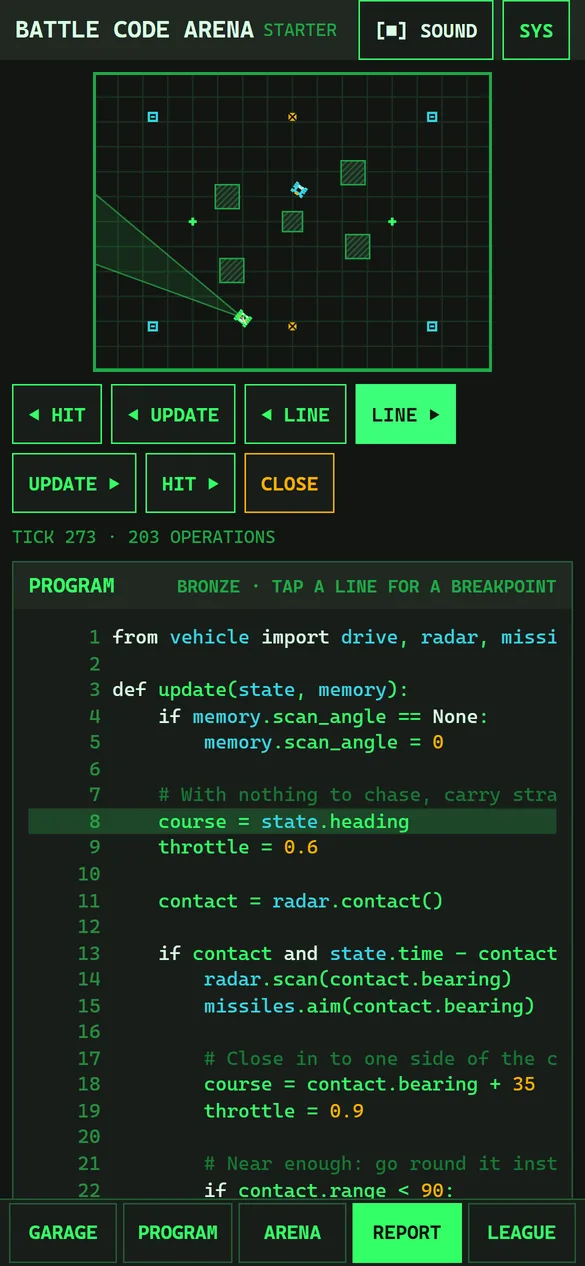
Opening it
- Fight a practice battle in the ARENA.
- Go to the moment you want to look at: drag along the timeline, or tap an event in the report.
- Press DEBUG, under the arena or on the report.
The debugger opens at that moment. CLOSE goes back to the arena.
It works on battles fought on your device: practice battles, and the battles of the league's trial. Battles always go the same way, so the debugger fights the battle again with your program traced, and it comes out exactly as you watched it. It can't open league battles, which are fought on our servers, and it never shows a house vehicle's program. If you fight one of your own vehicles against another, it steps through the one you have open.
Moving through the battle
| Button | Goes |
|---|---|
| LINE ▶, ◀ LINE | One line of your program on, or back |
| UPDATE ▶, ◀ UPDATE | One update on or back: a tenth of a second, a whole run of your program |
| HIT ▶, ◀ HIT | On to the next breakpoint, or back to the last one |
The arena above follows along. The line under the buttons gives the tick and how many OPERATIONS the update used (against your class's limit), and, on a line with an if, which way it's about to go: THIS IF: TAKEN, NOTHING TAKEN, or which branch. If the update failed, it says FAULT AT LINE and why.
What you can see
- PROGRAM: your program, with the line being run marked. A line that failed is marked too. The tag says which class's section is running.
- VARIABLES: the update's own variables, as they are now. A value that has just changed is amber.
- MEMORY: everything in
memory. - CALLS: each function your program called this update, with what it gave back: what
radar.contact()reported, whethermissiles.ready()was true. - ORDERS: the orders your program gave this update, such as
drive.setormissiles.fire. A failed update gives none. - STATE: what
stateheld at the start of the update: position, heading, speed, health, energy, heat and the rest.
Breakpoints
A breakpoint stops the battle at the moment something happens, so you needn't step there by hand. HIT ▶ goes to the next one. The tag shows how many times the breakpoints are hit in the whole battle.
- On a line: tap a line of the program. A ● marks it. Tap it again to take it off.
- On a condition: type one, such as
contact.range < 90, and press STOP WHEN TRUE. It stops when the condition becomes true. Type a condition and then tap a line to stop on that line only when it's true. - On an order: WHEN IT FIRES, WHEN IT SCANS and WHEN IT DROPS A DECOY stop when your program gives that order.
Each breakpoint is listed with a ✕ to remove it.
missiles.fire() and look at the if above it. Is missiles.ready() false in CALLS, or is the turret not yet on target?