Vehicles and the garage
What a vehicle is made of, and everything the GARAGE tab does.
A vehicle is a chassis, the equipment fitted to it, and a program. The garage keeps your vehicles. The one you have open there is the one every other tab works with.
The GARAGE has three pages, chosen at the top: VEHICLES, EQUIPMENT and RULES.
Classes
Every vehicle is in a class, and the class sets what it can spend. Everyone starts in Bronze. A vehicle reaches Silver and then Gold by being promoted in the league (see The league).
| Class | Build points | Mass allowance | Operations per update | Memory fields | What it brings |
|---|---|---|---|---|---|
| Bronze | 100 | 72 | 2000 | 64 | One turret, basic sensors and defences. |
| Silver | 140 | 90 | 4000 | 128 | Tracking radar, guided and twin launchers, decoys and close-combat weapons, with room to fit them. |
| Gold | 180 | 110 | 8000 | 256 | The best of everything: a third generation of every piece, and the room to fit it. |
A higher class brings a bigger budget, a faster processor (more operations each time the program runs), more memory, and new equipment. Equipment from a class above yours is shown, so you can see what's to come, but can't be fitted.
The budget: build points and mass
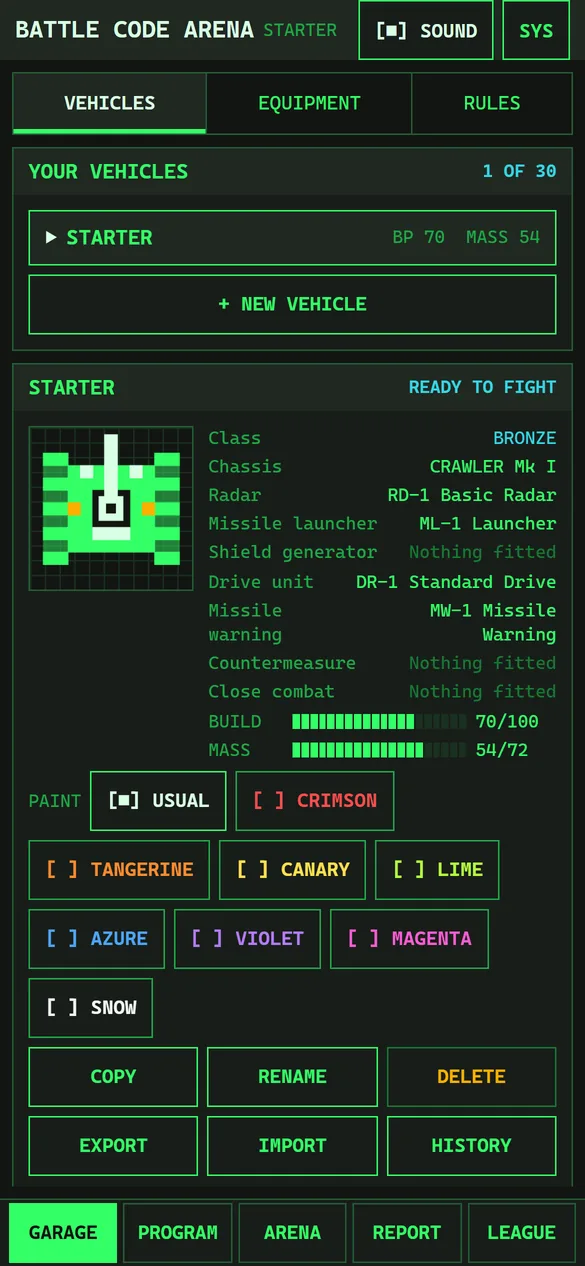
Each piece of equipment costs build points (BP) and adds mass. The two meters on the vehicle's card show what it uses against what the class allows:
- BUILD 70/100: 70 of the 100 build points are spent.
- MASS 54/72: 54 of the 72 units of mass are used.
A meter turns amber when the vehicle is over. A vehicle over either limit is NOT READY and can't fight until you take something off. Mass also slows a vehicle: every unit costs a little top speed, more on lighter chassis.
Chassis
The chassis is what everything else is fitted to. It costs nothing, and it sets the vehicle's health, energy tank and speed, and how much of the class's budget it can use. There are three kinds, each rebuilt for Silver (Mk II) and Gold (Mk III):
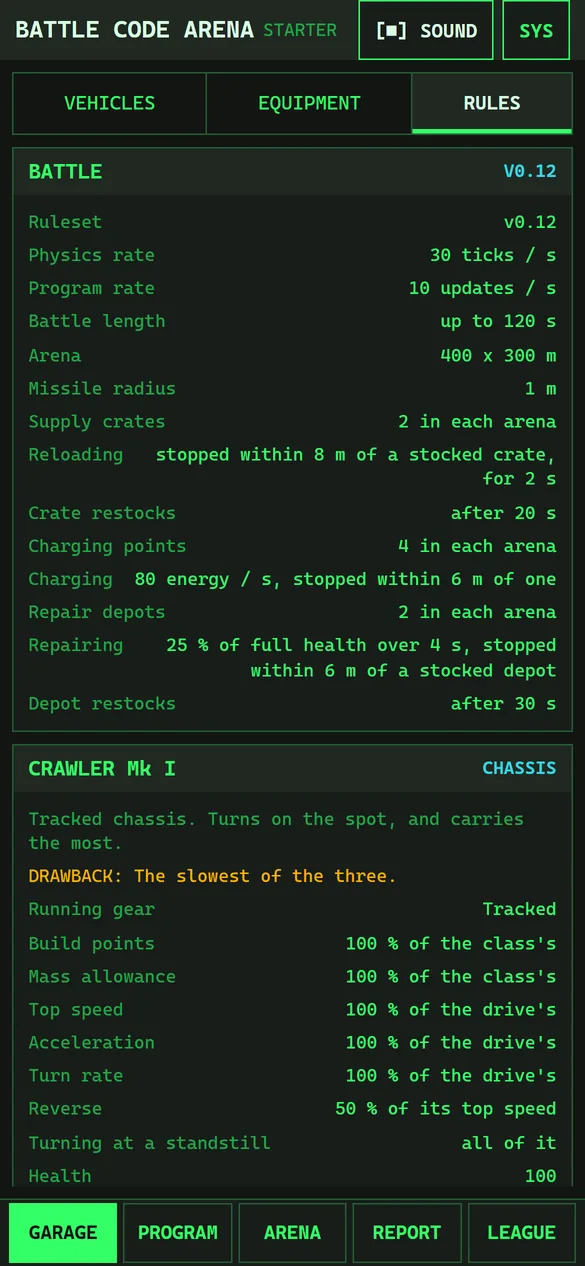
- CRAWLER (tracked): turns on the spot and carries the most. The slowest.
- HAULER (half-track): wheels in front to steer, tracks behind. Quicker than tracks and tougher than wheels, but turns slowly until it's rolling.
- ROVER (wheeled): the fastest and the smallest target, but it can't turn where it stands, carries the least, and a load slows it most.
| Chassis | Class | Running gear | Health | Energy | Top speed | Budget |
|---|---|---|---|---|---|---|
| CRAWLER Mk I | Bronze | Tracked | 100 | 400 | 100 % | 100 % |
| HAULER Mk I | Bronze | Half-track | 90 | 400 | 112 % | 90 % |
| ROVER Mk I | Bronze | Wheeled | 80 | 400 | 125 % | 80 % |
| CRAWLER Mk II | Silver | Tracked | 110 | 450 | 100 % | 100 % |
| HAULER Mk II | Silver | Half-track | 99 | 450 | 112 % | 90 % |
| ROVER Mk II | Silver | Wheeled | 88 | 450 | 125 % | 80 % |
| CRAWLER Mk III | Gold | Tracked | 120 | 500 | 100 % | 100 % |
| HAULER Mk III | Gold | Half-track | 108 | 500 | 112 % | 90 % |
| ROVER Mk III | Gold | Wheeled | 96 | 500 | 125 % | 80 % |
Top speed is a share of the drive unit's top speed. Budget is the share of the class's build points and mass the chassis can use.
Equipment
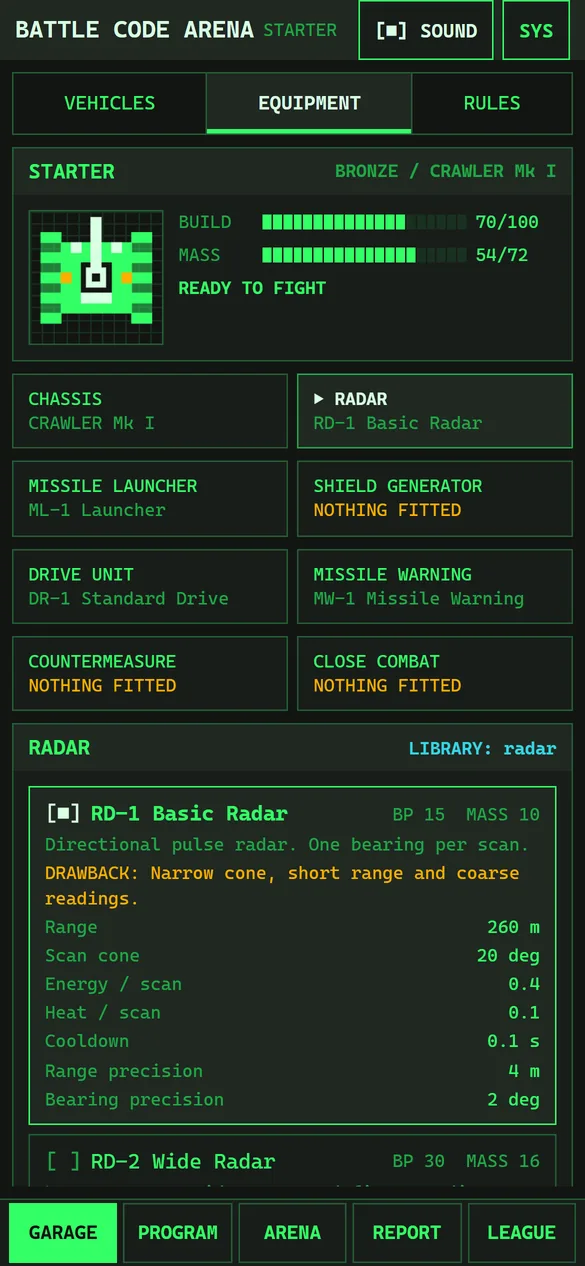
There are seven slots besides the chassis. Each slot's equipment unlocks a library your program can import: with no radar fitted, a program can't import radar. A slot can be left empty (NOTHING FITTED) to save points and mass.
To change a slot, open EQUIPMENT, tap the slot, and tap a part in the list below. The part fitted is marked [■], and its full figures appear under it. [×] marks a part for a higher class, with the class it needs (FOR SILVER AND ABOVE). Each part has an amber DRAWBACK: there's no part that's better at everything.
Radar radar
| Part | From | BP | Mass | What it does | Drawback |
|---|---|---|---|---|---|
| RD-1 Basic Radar | Bronze | 15 | 10 | Directional pulse radar. One bearing per scan. | Narrow cone, short range and coarse readings. |
| RD-2 Wide Radar | Bronze | 30 | 16 | Longer range, wider cone and finer readings. | Twice the energy and more heat per scan; heavier and costlier. |
| RD-3 Tracking Radar | Silver | 40 | 18 | Locks onto what a scan found, then reports it every update without scanning. | Draws energy all the time it holds a lock. Losing sight of the target, or a decoy, breaks it. |
| RD-4 Phased Array Radar | Gold | 50 | 20 | Locks on as the RD-3 does, and sees further, wider and more precisely, for less energy. | The heaviest and costliest radar; a lock still draws energy, and a decoy or lost sight still breaks it. |
Missile launcher missiles
| Part | From | BP | Mass | What it does | Drawback |
|---|---|---|---|---|---|
| ML-1 Launcher | Bronze | 25 | 22 | Unguided missiles, launched along the turret. | Slow reload. |
| ML-2 Rapid Launcher | Bronze | 35 | 26 | An autoloader halves the reload time. | Runs hot, hits softer and has a slower turret; sustained fire causes thermal lockout. |
| ML-3 Guided Launcher | Silver | 45 | 28 | Each missile steers itself towards the nearest target ahead of it. | Slower missiles, few of them and a slow reload. A decoy nearer than the target draws them off. |
| ML-4 Twin Launcher | Silver | 45 | 30 | Launches two unguided missiles at once, a little apart. | Heavy, hot, and each missile hits softer; a salvo empties it twice as fast. |
| ML-5 Heavy Launcher | Gold | 50 | 32 | Fast, hard-hitting missiles from a quick turret, reloaded quickly. | Heavy and costly, and each shot takes a lot of energy and heat. Its missiles fly straight. |
Shield generator shield
| Part | From | BP | Mass | What it does | Drawback |
|---|---|---|---|---|---|
| SG-1 Shield Generator | Bronze | 25 | 18 | Absorbs part of each hit while powered. | Constant energy drain and heat; offline when overheated or out of energy. |
| SG-2 Reactive Shield | Silver | 30 | 20 | Absorbs more of each hit than the SG-1, for less energy and heat. | Heavier and costlier; still offline when overheated or out of energy. |
| SG-3 Aegis Shield | Gold | 40 | 22 | Absorbs more of each hit than any other shield, for the least energy and heat. | The heaviest and costliest shield; still offline when overheated or out of energy. |
Drive unit drive
| Part | From | BP | Mass | What it does | Drawback |
|---|---|---|---|---|---|
| DR-1 Standard Drive | Bronze | 15 | 14 | Efficient tracked drive. | Modest speed and turn rate. |
| DR-2 Turbo Drive | Bronze | 30 | 18 | Much faster and more agile. | Uses 2.5 times the energy and runs hot, leaving less for shields and weapons. |
| DR-3 Vector Drive | Silver | 32 | 16 | Nearly the turbo's speed, the sharpest turning of any drive, and far less energy. | Costlier than the turbo, and a little slower in a straight line. |
| DR-4 Pulse Drive | Gold | 40 | 18 | The fastest and sharpest-turning drive, for a modest draw of energy. | The costliest drive, and it runs warmer than the DR-3. |
Missile warning warning
| Part | From | BP | Mass | What it does | Drawback |
|---|---|---|---|---|---|
| MW-1 Missile Warning | Bronze | 15 | 8 | Reports the opponent's missiles that are coming for you: where, how far, and how long until they arrive. | Short range, coarse readings and a constant energy draw; it adds weight and does nothing about the missile itself. |
| MW-2 Missile Warning | Silver | 17 | 9 | Reports up to three incoming missiles at once, further out and more precisely than the MW-1. | A bigger constant energy draw, and heavier. |
| MW-3 Missile Warning | Gold | 22 | 10 | Reports up to five incoming missiles, further out and more precisely than any other sensor. | The biggest constant energy draw of the three, and the heaviest. |
Countermeasure decoys
| Part | From | BP | Mass | What it does | Drawback |
|---|---|---|---|---|---|
| DC-1 Decoy Launcher | Silver | 20 | 8 | Drops a decoy that radar and guided missiles take for a target, if it is nearer. | Only four, they don't last, and a decoy fools nothing that is already closer to you. |
| DC-2 Decoy Launcher | Gold | 25 | 9 | More decoys than the DC-1, each lasting longer and looking bigger, launched more often. | Costlier and heavier; there is still no restocking them. |
Close combat close
| Part | From | BP | Mass | What it does | Drawback |
|---|---|---|---|---|---|
| AC-1 Autocannon | Silver | 35 | 20 | Shots straight ahead of the hull, hitting at once at close range. Never runs out. | Short range, light hits, and it heats up fast: aim by driving. |
| RP-1 Ram Plate | Silver | 15 | 16 | Armour on the nose: drive into the opponent and it takes damage by how fast you closed. | Heavy, you take a share of the blow, and it does nothing unless you get there. |
| FL-1 Flamethrower | Silver | 30 | 18 | A cone of fire ahead of the hull that burns anything in it. | Very short range, and it burns through energy and heat while it is on. |
| AC-2 Rotary Cannon | Gold | 45 | 22 | A faster-firing autocannon that reaches further. | Hotter and hungrier than the AC-1, and heavier. |
The classes and equipment page of the reference has every part's figures side by side.
Is it ready to fight?
The vehicle's card says READY TO FIGHT or NOT READY. Not ready means a fault, either in the build (over budget, or a part from a higher class) or in the program (an error, or an import of a library whose equipment isn't fitted). EQUIPMENT lists every fault, and PROGRAM marks the program's own (see Writing the program).
Your vehicles
The YOUR VEHICLES list shows each vehicle with its build points and mass. The tag says how many you have and how many the garage holds: 3, or 30 with the subscription. Tap a vehicle to open it.
- + NEW VEHICLE adds a Bronze vehicle with the STARTER program.
- COPY saves a copy of this vehicle and carries on with it. Use it before trying something risky: you can fight the old version in the arena, or several versions against each other in the league's trial. A copy starts in Bronze.
- RENAME changes the name (up to 24 characters).
- DELETE deletes the vehicle and its program, after asking. It can't be undone, and your last vehicle can't be deleted.
- EXPORT gives the vehicle as a vehicle package: its equipment and program as text, to copy or save as a file.
- IMPORT adds a vehicle from a package, pasted or opened from a file. It's checked first, and any problems are listed.
- HISTORY (with the subscription) lists the versions of the vehicle kept with your account, saved and published. Pick one to see what's changed since, or two to compare them. GO BACK TO THIS VERSION makes it the current version, as a new save, so nothing is lost.
- PAINT (with the subscription) colours the vehicle in battle: Crimson, Tangerine, Canary, Lime, Azure, Violet, Magenta, Snow. USUAL is the standard colour. If both vehicles have the same paint, the second keeps its usual colour.
The RULES page
RULES shows the numbers both sides fight by (the arena's size, the charging, reloading and repair rules, and so on), every chassis with its full figures, and HOW IT WORKS: short notes on timing, radar, memory, energy and the rest. The arena and battles explains the same rules with more room.