Writing the program
The PROGRAM tab: the editor for your vehicle's program, and how it tells you what's wrong.
Your vehicle's program is written in BCAS (Battle Code Arena Script), a small language made for the game that reads like Python. A program is one function, update(state, memory), which the game runs ten times a second during a battle. Each time, the program reads what the vehicle knows (state, and what it remembered in memory) and gives its orders: where to drive, where to scan, where to aim and when to fire.
This page is about the editor. For the language itself, Your first program starts from nothing, and the reference has every function and rule.
Starting out
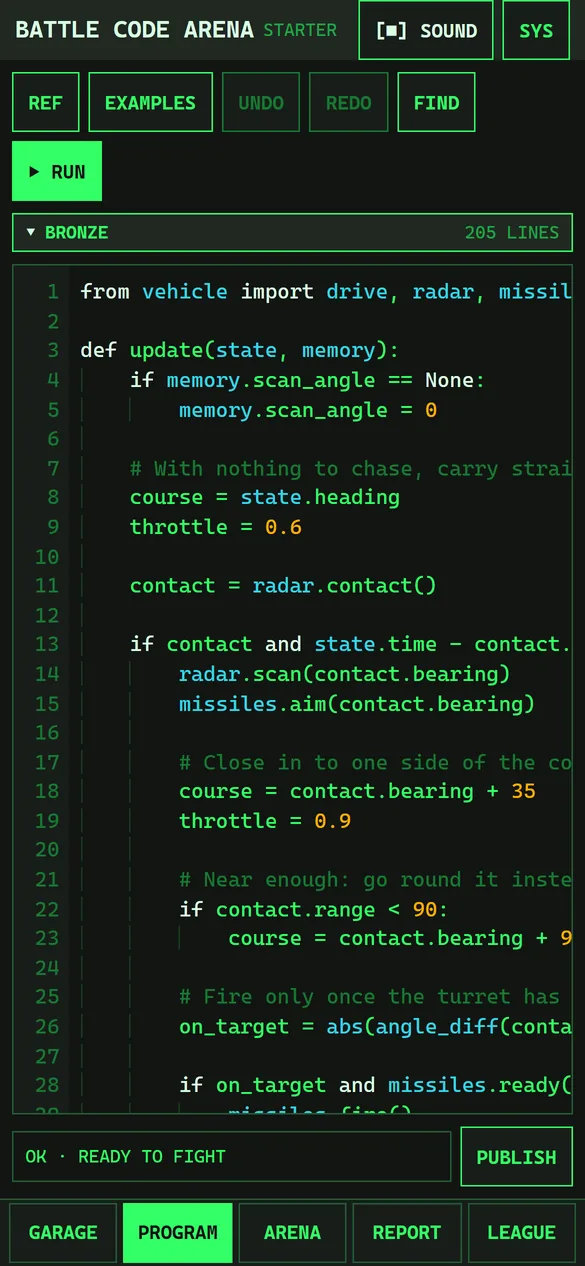
You don't have to start from a blank page. Every new vehicle comes with the STARTER program, which already searches for the opponent, closes in and fires. Change a number in it, run a battle, and watch what's different. Most players start that way.
EXAMPLES has complete programs to load, including the training opponents' own. Loading one replaces the program of the vehicle you have open, so COPY the vehicle in the garage first if you want to keep what it has.
The buttons
| Button | What it does |
|---|---|
| REF | The command reference: every library, function, field, built-in and limit, straight from the game. Each library says whether it's FITTED on this vehicle. |
| EXAMPLES | Complete programs to read or load. |
| UNDO, REDO | Steps back and forward through your changes. |
| FIND | Finds text in the program, with ▲ and ▼ for the previous and next match. |
| ▶ RUN | Runs a battle against the opponent chosen in the arena (on a phone; on a bigger screen the arena's controls are beside the editor). |
| PUBLISH | Publishes the vehicle to the league, once it's ready to fight (see The league). |
Typing
The editor colours the program as you type and draws a faint guide at each level of indentation. BCAS uses indentation, as Python does, of four spaces a level:
- Enter starts the new line at the same indentation, and four spaces further in after a line ending in a colon.
- Tab indents by four spaces, and Shift+Tab takes four off. A tab character pasted in becomes four spaces, because BCAS doesn't allow tabs.
- As you type a name, the words that could finish it appear as buttons under the editor. Tap one to use it, or press Enter for the first. Ctrl+Space asks for them.
- With a keyboard: Ctrl+Z undoes, Ctrl+Y redoes and Ctrl+F finds.
The status line
The line under the editor says how the program stands:
- OK · READY TO FIGHT: no errors, and it can fight.
- An error: where it is, the kind of error in brackets, what's wrong and, often, a hint. Lines with an error are marked in the margin. Tap the status line to jump to the error, and again to go on to the next (ERROR 1 OF 3 · CLICK FOR THE NEXT).
- An error in another section says which (see below).
- BUILD: a fault in the equipment, not the program: fix it in the garage.
A battle won't start while there's an error, so you're never left wondering why your vehicle sat still.
Sections, one for each class
A program has a section for each class the vehicle has reached, Bronze first. The headings above and below the editor are the sections. Tap one to open it, and tap the open one to fold it away. Each heading says how long the section is, or NOTHING WRITTEN.
Each section is a program of its own, with its own imports and its own update. In a battle they all run every update, from Bronze up, and a later section's orders replace an earlier one's. They share memory. So when a vehicle is promoted to Silver, its Bronze program keeps working, and you write a Silver section only for what you want to do differently.
A section marked SET ASIDE · NOT RUN belongs to a class above the vehicle's own: after it was relegated, or in a copy (a copy starts in Bronze). It's kept, but not run.
Limits
A program has to fit the vehicle's processor and memory. These are Bronze's; Silver and Gold have more (see Classes):
| Limit (Bronze) | Value |
|---|---|
| Program size | 64 KiB |
| Operations per update | 2000 |
| Cost of a call | 10 operations extra |
| Memory fields | 64 |
| Memory size | 16 KiB |
| Local variables | 128 |
| String length | 256 characters |
| Debug messages per update | 4 |
| Nesting | 32 levels |
An update that goes over a limit, or fails in any other way, is a fault: everything it did is thrown away, the fault goes on the battle's timeline, and the program runs again at the next update. The battle report shows them.